DIFFERENTIAL EQUATIONS
using
MatLab
By Professor
Mohamad H. Hassoun
Department of
Electrical & Computer Engineering
Wayne Satate
University
Detroit, MI
48202
October 27,
1996
Contents:
I. Solution
of Linear Ordinary Differential Equations
II. Solution
of Simple Nonlinear Differential Equations
III. Numerical Solution
I. Solution of Linear Ordinary Differential
Equations
MatLab has a powerfull capability for solving
ordinary differential equations symbolically. The command for solving
differential equations symbolically is the dsolve command. Let us start by
solving a second order differential equation with a sinusoidal forcing function: y'' + y = cos(2x).Assume initial conditions
y'(0) = 0 & y(0) = 1.Here y'' = d2y/dx2 and y' = dy/dx.
y=dsolve('D2y + y = cos(2*x)', 'Dy(0)=0', 'y(0)=1')
-2/3*cos(x)^2+1/3+4/3*cos(x)
2
-
2/3 cos(x) + 1/3 + 4/3 cos(x)
This solution can be simplified to
-1/3*cos(2*x)+4/3*cos(x)
-
1/3 cos(2 x) + 4/3 cos(x)
The
second example is a linear second order homogeneous differential equation with no specific initial conditions: y'' +
2y' + 5y = 0
C1*exp(-x)*sin(2*x)+C2*exp(-x)*cos(2*x)
The two
constants can be determined from intial conditions y'(0) and y(0). Let us now repeat
the solution of the above equation but with a forcing function equals to -sin x
and initial conditions y'(0) = 0 and y(0) = 1. This renders the differential
equation nonhomogeneous.
y = dsolve('D2y+2*Dy+5*y
= -sin(x)', 'Dy(0)=0','y(0)=1')
3/40*sin(2*x)*cos(3*x)-1/40*sin(2*x)*sin(3*x)-1/8*sin(2*x)*cos(x)+1/8*sin(2*x)*sin(x)+1/8*cos(2*x)*cos(x)+1/8*cos(2*x)*sin(x)-1/40*cos(2*x)*cos(3*x)-3/40*cos(2*x)*sin(3*x)+11/20*exp(-x)*sin(2*x)+9/10*exp(-x)*cos(2*x)
-1/5*sin(x)+1/10*cos(x)+11/20*exp(-x)*sin(2*x)+9/10*exp(-x)*cos(2*x)
Let
us plot this solution

Let
us conclude this section by solving the third order linear differential
equation:
y'''
- 2y'' - y' +2y =2x2 - 6x + 4 with y''(0) = 1, y'(0) = -5, and y(0) = 5
y=dsolve('D3y-2*D2y-Dy+2*y=2*x^2-6*x+4','D2y(0)=1','Dy(0)=-5','y(0)=5')
-2*x+3+x^2+exp(x)-exp(2*x)+2*exp(-x)

II. Solution of Simple Nonlinear Differential Equations
The dsolve command can also be used to
solve some simple nonlinear differential equations. Here are some examples.
Example
1: A nonlinear differential equation
which can be solved by integration,
y'
+ y2 = 1
tanh(x-C1)
Example
2: Euler-Cauchy Eqution (case of distinct real roots), x2y'' - 2.5xy' - 2y = 0
dsolve('x^2*D2y
- 2*x*Dy - 2*y')
C1*x^(3/2-1/2*17^(1/2))+C2*x^(3/2+1/2*17^(1/2))
Example
3: Euler-Cauchy Eqution (double root case), x2y'' - 3xy' + 4y = 0
dsolve('x^2*D2y - 3*x*Dy + 4*y')
C1*x^2+C2*x^2*log(x)
Example
4: Euler-Cauchy Eqution (double root case), x2y'' + 7xy' + 13y = 0
dsolve('x^2*D2y
+ 7*x*Dy + 13*y')
1/x^3*C1*sin(2*log(x))+1/x^3*C2*cos(2*log(x))
Example
5: A differential equation which may be reduced to a separable form:
y' -y/x - 2x3cos(x2)/y with y(p1/2)=0
dsolve('Dy - y/x
- 2*x^3*cos(x^2)/y','y(sqrt(pi))=0')
[-1/2*4^(1/2)*x*2^(1/2)*sin(x^2)^(1/2)]
[ 1/2*4^(1/2)*x*2^(1/2)*sin(x^2)^(1/2)]
This suggests that the solution is y = +- x(sin x2)1/2
fplot('x*sqrt(2*sin(x^2))',[-sqrt(pi)
sqrt(pi)])

III. Numerical Solution of Differential Equations
Numerical solution of differential equations may
also be used to generate solutions to linear as well as nonlinear differential
equations of any order, for a specific set of initial conditions. MatLab offers
two functions for the numerical solution of ordinary differential equations: ode23 and ode45.
Next, we illustrate the numerical solution to the
linear second order ordinary differential:
y'' + 2y' + 5y =
-sin(x) with y'(0) = 0 and y(0)
= 1
whose symbolic solution was computed and plotted in
Section I. Before using the ode23 function we need to rewrite the above
equation as a set of two simultaneous first order differential equations
involving new functions z(1)' and z(2)', as follows:
Let z(1) = y
and z(2) = y', then we write
z(1)' = y'
z(2)' = y'' = -2y' - 5y - sin(x)
or
z(1)' = z(2)
z(2)' = -2z(2) - 5z(1) - sin(x)
Next, let zprime be a column vector defined as zprime = [z(2); -2z(2) -5z(1) -sin(x)] and write a MatLab function linear1.m (use a wordprocessor to
create a MatLab m-file called linear1.m and save it in the notebook folder) which returns x and the solution vector y and
y'. Here is the required m-file:
function zprime=linear1(x,z);
zprime=[z(2); -2*z(2)-5*z(1)-sin(x)];
Now, we are ready to generate the solution:
cd([matlabroot '/notebook']) % Need to first set path to directory: notebook
[x,z] = ode23('linear1',0,20,[1;0]);
y=z(:,1); % first column of z is y.
yprime=z(:,2); % second column of z is dy/dx
plot(x,y,x,yprime,'--')
xlabel('x'), ylabel('y & dy/dx')
title('d^2y/dx^2 + 2dy/dx+ 5y = -sin(x) with dy(0)/dx = 0 & y(0) = 1')

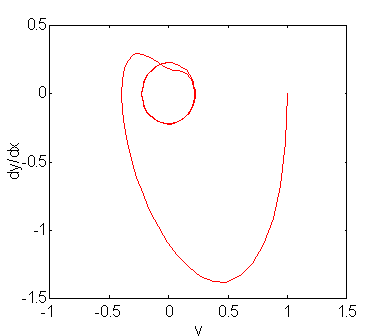
A useful plot which shows the trajectory of the
state of the dynamical system described by the above differential equation may
now be generated by plotting y' versus y. The state space trajectory starting
from the initial state (1,0) is shown below.
xlabel('y'), ylabel('dy/dx')
axis([-1 1.5 -1.5 .5]) % defines axis range for plot
We conclude this Module with a solution to the Van der
Pol differential equation (a second order nonlinear ordinary differential
equation with no closed form solution):
d2x/dt2 - m(1-x2)dx/dt + x = 0
Let the vector of state derivatives be yprime = [y(2);
a*(1-y(1)^2*y(2) - y(1)], where m=2, y(1) = x, and y(2) = x'.
An m-file called vdpol.m has already been created which defines the
function yprime. It is saved in the notebook folder. Here it is
function yprime = vdpol(t,y);
%VDPOL Returns
the state derivatives of the Van der Pol equation.
% With
MU = 1, the problem is non-stiff. As MU
increases, the problem
% becomes
increasingly stiff.
% x''
- mu*(1-x^2)*x' = 0
% Let
y(1) = x and y(2) = x'
% Then
y(1)' = y(2)
% y(2)'
= mu*(1-y(1)^2)*y(2) - y(1)
%
MU = 2; %choose 0 < MU < 10
yprime=[y(2); MU*(1 - y(1)^2)*y(2) -
y(1)]; % yprime is a column vector
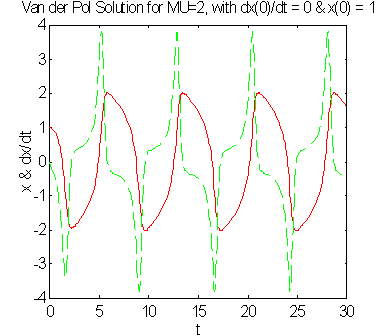
The
following is the solution assuming initial conditions x(0) = 1 and x'(0) = 0.
cd([matlabroot '/notebook']) % need to first set path to directory: notebook
[t,y] = ode23('vdpol',0,30,[1;0]);
x=y(:,1); % first column of y is x
xprime=y(:,2); % second column of y is dx/dt
plot(t,x,t,xprime,'--')
xlabel('t'), ylabel('x & dx/dt')
title('Van der Pol Solution for MU=2, with dx(0)/dt = 0 & x(0)
= 1')
axis('auto')
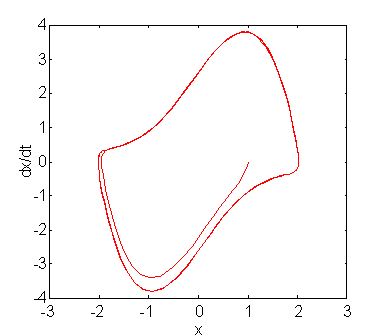
Finally, we plot the state space trajectory x' vs x which depicts what is known as a "limit cycle."
xlabel('x'), ylabel('dx/dt')