LINEAR ALGEBRA
Matrix Manipulation & Solution of Systems
of Linear Equations
using
MatLab
By Professor
Mohamad H. Hassoun
Department of
Electrical & Computer Engineering
Wayne Satate
University
Detroit, MI
48202
October 19,
1996
Contents:
I. Vectors
& Matrices
II. Matrix
Algebra
III. Matrix Determinant and Inverse
IV. Solution
of Linear Systems of Equations
V. Simple
programs: Creating and Plotting Arrays
I. Vectors
& Matrices
Let us start by defining
a 1 by 3 vector b (a 3-dimensional
row vector)
b = [1 2.5 (-1/3)]; % semicolon after a MatLab statement suppresses display.
and display
it
format
short % sets numerical display format
to short decimal format
1.0000 2.5000 -0.3333
Now
define a new vector y as the transpose
of b (bT)
1.0000
2.5000
-0.3333
This
is a quick way of creating a special
row vecotr:
1 2 3 4 5
Let
us look at another example:
1
3
5
7
9
Note: MatLab
allows you to change the number display
format
1.00
2.50 -0.33
1 5/2 -1/3
1.0000e+000
2.5000e+000 -3.3333e-001
1.00000000000000 2.50000000000000 -0.33333333333333
Now back to the original (default) short format
Let us define a 3 by 3 matrix A
A = [3,2,1; 0,-1/3,1/5; 2,1,-1]
3.0000 2.0000
1.0000
0 -0.3333
0.2000
2.0000 1.0000 -1.0000
and a 3 by 2 matrix B
1.0000 3.0000
-1.0000 1.5000
4.0000 3.1416
Note: pi = 3.1415... is one of
a number of predefined Matlab variables. The following are four other
predefined variables (eps, inf, NaN, I):
2.2204e-016
ans =
Inf
ans =
NaN % NaN stands for not a number
i % An imaginary number equals to the square-root of -1
0 + 1.0000i % See the Module on complex numbers for more details
0 + 1.0000i
II. Matrix
Algebra
The following illustrates various matrix operations (transpose, addition,
multiplication)
3.0000 0
2.0000
2.0000 -0.3333
1.0000
1.0000 0.2000 -1.0000
6.0000 2.0000
3.0000
2.0000 -0.6667
1.2000
3.0000 1.2000 -2.0000
0 0
0
0 0
0
0 0 0
9.0000 6.0000
3.0000
0 -1.0000
0.6000
6.0000 3.0000 -3.0000
A * B % note that B * A, is not defined (why?)
5.0000 15.1416
1.1333 0.1283
-3.0000 4.3584
A * b' % b is the vector defined above; A * b is not defined (why?)
7.6667
-0.9000
4.8333
10.0000 6.0000 0
8.0000 5.4444
0.7333
-1.0000 -0.0667 3.0400
Other means of defining
special matrices and vectors (arrays)
1 2 3 4 5
1 3
5
a2 =
10 9 8 7 6 5 4 3 2 1 0
1 2
3 4
3 4 5 6
I = diag(A) % extracts the diagonal elements of matrix A as a column vector
3.0000
-0.3333
-1.0000
diag(I) % creates a diagonal matrix with the vector I on the diagonal
3.0000 0 0
0 -0.3333 0
0 0 -1.0000
1 0
0 0
0 1
0 0
0 0
1 0
0 0 0 1
1 1
1
1 1
1
1 1 1
0 0
0 0
R = rand(3:3) % creates a 3 by 3 random
matrix with uniform values in [0 1]
0.9304 0.0920
0.7012
0.8462 0.6539
0.9103
0.5269 0.4160 0.7622
Check
out these additional operations on
the components of a vector or a matrix
2.0000 3.5000 0.6667
which
is equivalent to the addition of the two vectors:
2.0000 3.5000 0.6667
The following command subtracts 2 from each and every component of the matrix A
1.0000 0
-1.0000
-2.0000 -2.3333
-1.8000
0 -1.0000 -3.0000
b .* b % component-wise
multiplication of two vectors: no space between '.' and '*'.
1.0000 6.2500 0.1111
A .^ 2 % component-wise
squaring of matrix elements
9.0000 4.0000
1.0000
0 0.1111
0.0400
4.0000 1.0000 1.0000
Compare this last result to A*A = A^2
11.0000 6.3333
2.4000
0.4000 0.3111
-0.2667
4.0000 2.6667 3.2000
11.0000 6.3333
2.4000
0.4000 0.3111
-0.2667
4.0000 2.6667 3.2000
Some
logical operations
1 1
1
0 0
1
1 1 0
0 0
1
1 1
1
0 1 1
-0.3333
3 2 1
More operations: Eigenvalues of a matrix
3.4970
-1.4662
-0.3641
we
can display the individual values as follows
3.4970
-1.4662
-0.3641
Eigenvectors: [V,D] = EIG(A) produces a
diagonal matrix D of eigenvalues and a full matrix V whose columns are the
corresponding eigenvectors so that A*V = V*D.
0.9117 -0.1412
-0.4768
0.0214 -0.1721
0.8688
0.4102 0.9749
-0.1335
D =
3.4970 0 0
0 -1.4662 0
0 0 -0.3641
We may now verify the second eigenvector-eigenvalue pair (v2 , l2) to see that Av2 = l2v2
0.2071
0.2524
-1.4294
0.2071
0.2524
-1.4294
Characteristic polynomial associated with a square
matrix (|lI - A| = 0):
1.0000 -1.6667 -5.8667 -1.8667
which
represents the polynomial l3 - 1.67 l2 - 5.87 l - 1.87 = 0. One may also synthesize a matrix (companion matrix) from a given
characteristic polynomial
1.6667 5.8667
1.8667
1.0000 0 0
0 1.0000 0
Verification
of result
1.0000 -1.6667 -5.8667 -1.8667
Rank of a matrix
r = rank(A) % Matrix rank
3
Here is a rank computation of another 3 by 3 matrix
rank([1, 1, 1; 2, 2, 2; 1, 2, 1]) % note that the second row is a linear scaling of the first
2
trace(A) % Matrix trace
1.6667
Compare
'ans' to the sum of the diagonal elements of A
1.6667
Size of a matrix/vector:
3 3
1 3
3
3.0000 2.0000
1.0000
0
0.3333 0.2000
2.0000 1.0000 1.0000
III. Matrix Determinant and
Inverse
Let
us define a new matrix A1
A1 = [1/2, 1/2,1 ,-1; 1, -1, -1, -1; -1, -1/4, 1, 1;1,-1,-8,1]
0.5000 0.5000
1.0000 -1.0000
1.0000 -1.0000
-1.0000 -1.0000
-1.0000 -0.2500
1.0000 1.0000
1.0000 -1.0000 -8.0000 1.0000
The determinant of A1 is
0.6250
0.6250
compare
this result to the product of all
eigenvalues of A1
1.4307 + 3.0894i
1.4307 - 3.0894i
-1.3205
-0.0408
Note that eigenvalues can be complex (here i2 = -1). Check the module on complex numbers for details.
e(1)*e(2)*e(3)*e(4)
% this is the product of the four
eigenvalues of A1
0.6250
The
following is the inverse of matrix A1
-18.0000 -1.2000
-15.2000 -4.0000
0 -0.8000
-0.8000 0
-4.0000 -0.2000
-3.2000 -1.0000
-14.0000 -1.2000 -11.2000 -3.0000
Check
A1-1
A1
1.0000 0.0000
0.0000 0
0 1.0000 0 0
0 0.0000
1.0000 0
0 0 0.0000 1.0000
1.0000 0.0000
0.0000 0
0 1.0000
0.0000 0
0 0.0000
1.0000 0
0.0000 0.0000
0.0000 1.0000
IV. Solution of Linear
Systems of Equations
Consider
the linear system of three unknowns given by
a11x1 + a12 x2 + a13 x3 = y1
a21x1 + a22 x2 + a23 x3 = y2
a31x1 + a32 x2 + a33 x3 = y3
which
can be expressed in matrix form as Ax = y. We may now solve for x in Ax = y
as x = A-1 y:
First,
let A be as defined above and let y be
1
2
3
4.4643
-6.1071
-0.1786
A
preferrable solution is one based on LU
factorization approach (modification of Gaussian elimination) since it is
faster and generally more accurate; here it is
4.4643
-6.1071
-0.1786
Another
Example with symbolic display of
results:
G = sym('[1/2, 1/2,1 ,-1; 1, -1, -1, -1; -1, -1/4, 1, 1;1,-1,-8,1]')
[1/2, 1/2, 1 , -1]
[ 1, -1, -1, -1]
[ -1, -1/4, 1, 1]
[ 1, -1, -8, 1]
[ 0]
[-10]
[ 0]
[ -1]
x =
linsolve(G,d) % linsolve is equivalent to the backslash operator used above
[16]
[ 8]
[ 3]
[15]
Linsolve also allows for symbolic A2 and/or b2. Let us consider
an example:
b2 = sym('2;1/t;3')
x = linsolve(A2,b2)
[1,2,t]
[0,1,0]
[t,1,0]
b2 =
[ 2]
[1/t]
[ 3]
x =
[ (3*t-1)/t^2]
[ 1/t]
[(2*t^2-5*t+1)/t^3]
One
can simplify or alter the above symbolic result in several ways by using symbolic manipulation commands such as
'simplify', 'collect', 'expand', and 'factor'. The above result for x may be
simplified to
[(2*t+2+3*t^2)/t]
[ 1/t]
[ (2*t^2+1)/t]
The same solution for x may be obtained by using direct 'symbolic' inversion of matrix A2, as follows:
[ 0, -1/t, 1/t]
[ 0, 1, 0]
[1/t, -(-1+2*t)/t^2, -1/t^2]
Next, the symbolic maltiplication 'symmul' command is used to solve for x (check also 'symadd', 'symdiv', and 'symsub')
[ (3*t-1)/t^2]
[ 1/t]
[(2*t^2-5*t+1)/t^3]
Here are some simplifications of the last expression:
[ -1/t^2+3/t]
[ 1/t]
[2/t-5/t^2+1/t^3]
[ (3*t-1)/t^2]
[ 1/t]
[(2*t^2-5*t+1)/t^3]
[ -1/t^2+3/t]
[ 1/t]
[2/t-5/t^2+1/t^3]
V. Simple programs: Creating
and Plotting Arrays
A
"for loop" may be used to create a 10-dimensional row vector/array,
as follows:
z(n)=sin(n*pi/10);
end
Columns 1 through 7
0.3090 0.5878
0.8090 0.9511 1.0000
0.9511 0.8090
Columns 8 through 10
0.5878 0.3090 0.0000
A
more efficient way of creating the above vector is to avoid the for loop
z=sin(n*pi/10)
Columns 1 through 7
0.3090 0.5878
0.8090 0.9511 1.0000
0.9511 0.8090
Columns 8 through 10
0.5878 0.3090 0.0000
Plotting Arrays
Let us now generate a simple plot for the array z
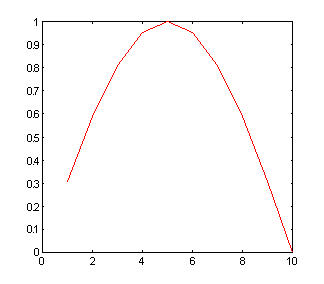
For
a better plot, use
title('My First Plot')
xlabel('Position Number in the Array'), ylabel('Value')
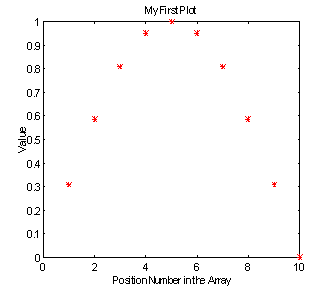
Now, take a look at this 2-D plot
for m=1:10
O(n,m) = sin((n+m)*pi/10);
end
end
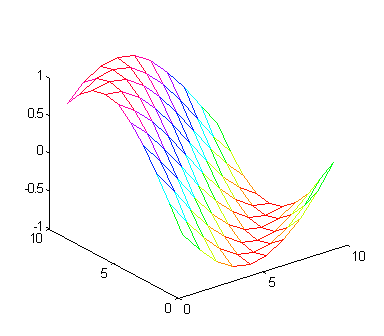
mesh(O)
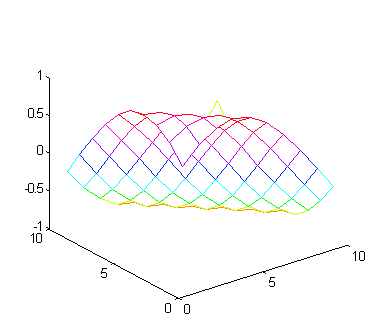
A better view can be arrived at by rotating the plot by 90 degrees:
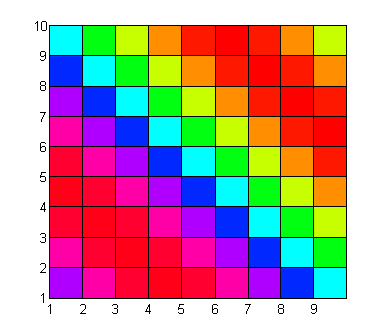
Yet, an alternative way to visualize the array O is possible by using the pseudocolor plot command 'pcolor'
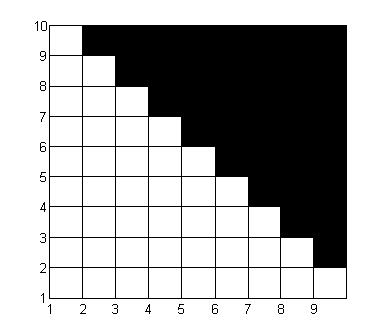
Here is a bipolar version of the above plot
colormap(gray(2))
We
conclude this module with the following random pattern:
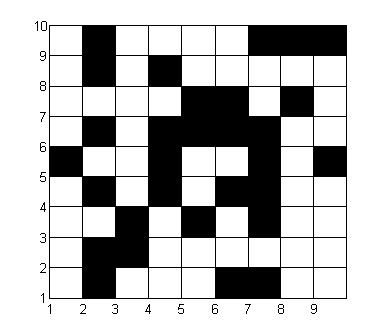
colormap(gray(2))